AI & workflow automation

Automate the predictable. Use AI where judgement actually helps.

We engineer workflows that move work between people, documents and systems with less manual coordination. Rules stay deterministic. AI handles the parts that need interpretation. People remain in control where the decision matters.

Workflow automation AI-assisted decisions Human approval where needed
Rules where certainty exists. AI where interpretation adds value.

Not every problem needs an AI agent

Choose the least complicated automation that can do the job reliably.

The strongest automation systems combine several kinds of work. Predictable steps remain deterministic. AI is introduced where inputs are messy or interpretation creates value. Human review stays where consequences, ambiguity or policy require it.

Use intelligence for uncertainty. Use software for everything that should behave the same way every time.

Repetitive rules and data movementDeterministic automation
Documents, emails and unstructured inputAI extraction
Classification, summarisation and contextAI assistance
High-consequence or exceptional decisionsHuman review
Actions across business systemsIntegration

From manual process to controlled automation

Scroll through the workflow.

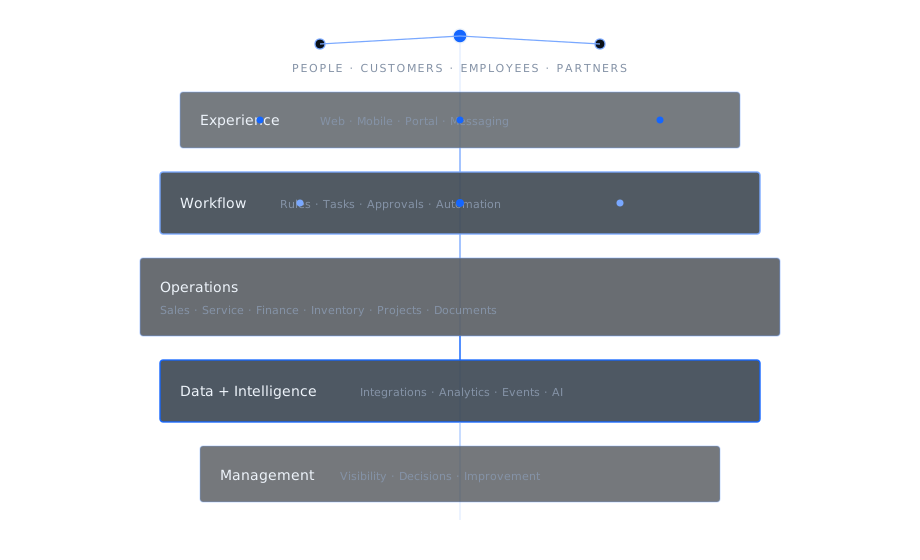
The automation becomes more intelligent only where the process needs it. The visual stays the same while rules, AI, human oversight and business actions are added around the work.

01 · Find the manual work

Start with the work people repeat, wait for or copy between systems.

We map triggers, inputs, decisions, exceptions and destinations before deciding whether the answer is a workflow, an integration, AI or a combination of them.

TriggersInputsExceptions
02 · Automate the certain parts

Make predictable work deterministic first.

Routing, validation, schedules, calculations, data movement and system updates should behave consistently. They do not become better simply because an LLM is inserted into them.

RulesRoutingValidation
03 · Add AI for ambiguity

Use AI where the input needs interpretation.

Documents, messages and open-ended information can be classified, extracted, summarised or compared before the workflow continues into a deterministic action.

ExtractClassifySummarise
04 · Keep a human gate

Do not automate away responsibility.

Approvals, policy exceptions, low-confidence results and consequential decisions can stop for a person while the rest of the process continues automatically.

ApprovalConfidenceException
05 · Operate it like software

Automation needs monitoring, ownership and improvement after launch.

Runs, failures, outputs and exceptions should remain observable so the workflow can be fixed, extended and adapted as the business changes.

LogsMonitoringSupport
01
Find the manual work

Start with what people repeat, wait for or copy.

Map the trigger, inputs, decisions, exceptions and destination before choosing the technology.

02
Deterministic automation

Automate the certain parts first.

Rules, routing, validation, calculations and system updates remain predictable.

03
AI judgement

Use AI for inputs that need interpretation.

Extract, classify, summarise or compare information before returning to a controlled workflow.

04
Human gate

Keep people where responsibility matters.

Low confidence, policy exceptions and consequential actions can stop for review.

05
Operate it

Treat automation like production software.

Monitor runs, failures and exceptions so the workflow can improve instead of silently drifting.

Where automation usually starts

Start with a process that already consumes attention.

You do not need an “AI strategy” before you can improve a workflow. A strong first project is usually a process with clear volume, repeated steps, visible handoffs or a queue of documents and decisions waiting for people.

Documents
Document intelligence

Turn document queues into structured workflows.

Extract fields, classify documents, compare content, route exceptions and move approved data into the systems that need it.

Operations
Cross-system workflow

Move work between systems without making people the integration layer.

Synchronise records, trigger downstream work, create tasks, send notifications and keep status aligned across tools.

Assistants
AI assistants & agents

Give AI enough context and boundaries to be useful.

Internal assistants and agents can retrieve knowledge, use approved tools and prepare actions while permissions, auditability and escalation remain explicit.

Control matters more as automation gets smarter

An AI workflow should be easier to inspect than the manual process it replaced.

Production automation needs boundaries: who can trigger it, what data it can access, what actions it can take, when it must stop and how a failed run is investigated.

Autonomy without visibility creates a faster way to lose control.

Scoped access to data and toolsPermissions
Human approval for defined actionsOversight
Run history, logs and exceptionsObservability
Fallbacks when AI or an external system failsResilience
Model and provider choices matched to the taskFlexibility

Prototype to production

Most automation risk is added quietly.

Turn common shortcuts on below. The meter is illustrative, not a risk score. It shows why an automation that works in a demo can become fragile once business volume, exceptions and external dependencies arrive.

Illustrative operational riskLower is healthier
22
Lean baseline

The goal is not maximum autonomy. It is the right amount of automation, with enough control that the business can trust it when volume and consequences increase.

Automation is an operating system, not a one-off script

The workflow should keep improving after the first task disappears.

Business processes change, external APIs change, AI models change and exceptions appear only after real usage begins. We can continue operating, improving and extending automations instead of leaving the client with a collection of unattended experiments.

Start with one painful workflow. Build a reliable automation layer from what you learn.

Workflow monitoring and production supportOperate
Prompt, model and rule refinementImprove
New systems and process integrationsExpand
Automation modernization as tools changeMaintain
Dedicated or augmented engineering capacityScale

AI & automation insights

Useful questions before somebody adds another agent.

These article themes are designed around the questions operators, buyers and technical teams ask when moving from an AI experiment to a workflow they can actually depend on.

Insight
Architecture decision

AI agent or workflow automation: which does the process actually need?

A practical way to separate predictable execution from work that genuinely benefits from autonomous reasoning.

Insight
Governance

Where should human approval sit inside an AI workflow?

Confidence, reversibility, financial impact and policy risk are better triggers for human review than a blanket rule of “human in the loop.”

Insight
Production engineering

Why AI automations fail after the prototype works.

Real volume introduces retries, malformed inputs, permissions, vendor failures, cost controls and edge cases the first demo never sees.

Insight
Document automation

How to automate document-heavy work without losing control.

Separate extraction, validation, policy decisions and downstream actions so one uncertain result cannot silently corrupt the whole process.

Discuss an automation

Show us the work people should not still be doing manually.

You do not need to decide whether it needs AI first. Show us the inbox, spreadsheet, document queue, approval chain, system handoff or repetitive decision. We can start by separating what should be automated from what should stay human.

Workflow automationRules + integrations
AI-assisted business processInterpret + decide
Document automationExtract + validate
AI assistant or agentKnowledge + tools
Existing automation modernizationStabilise + extend